How the Prechange Check works
The Prechange Check measures the conditions around people, not the people. This page sets out what it asks, who sees what, and how to read the results.
Last updated:
From Tilth: Preparing the Ground for Change by Sukant Ratnakar.
What the Check looks at
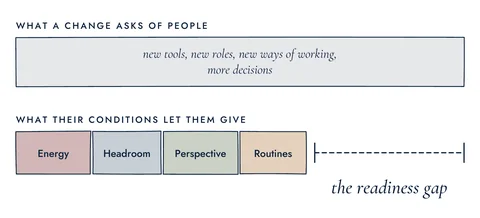
Every change asks something of people: new tools, new roles, new ways of working, more decisions. Four conditions decide how much people can give: energy, headroom, perspective and routines. Where they fall short of what the change asks, there is a readiness gap. The Check has 24 short statements, 6 for each condition, about your work over the past month. It takes about 6–8 minutes. It isn't a measure of performance, ability or character.
Who can take the Check
Anyone aged 16 or over can take the Check. You take it on your own through prechangeway.com/start, or through a Room link someone sends you. You create your own account with your name and email, through Google or with an email and a password, and you give your consent before you start. The account is yours, not your employer's: it holds your reports, so you can see what changes over time. Taking part is your choice.
On your own, or in a Room
On your own, you can take the Check once every 90 days. When a new version of the Check comes out, you can take it once straight away, and the 90 days then start again. Your report has a box, "Remind me in 90 days". If you tick it, we send one email when you can take the Check again.
From Tilth: Preparing the Ground for Change by Sukant Ratnakar.
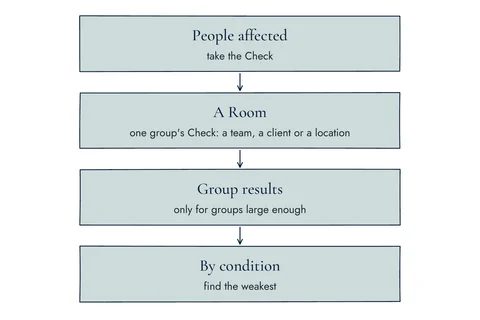
A Room is one group's Check: a team, a client or a location. Consultants, HR managers and business leaders in the Prechange Partner Programme open Rooms and share the link. Each person takes a Room's Check once, while the Room is open, and it doesn't change their own 90 days. While the Room is open, its owner sees only how many people have taken part, never who. The results appear after the Room closes.
Group results need 5 people or more
A group's results are shown only when 5 or more people's Checks count in them. Below that, no result is shown, only the number of people who took part. There are no exceptions. Checks from different versions of the Check are never combined. A Room owner's own Check is left out of their Room's results. Group results show the Prechange Index and the four conditions, never how anyone answered one statement.
Your own report
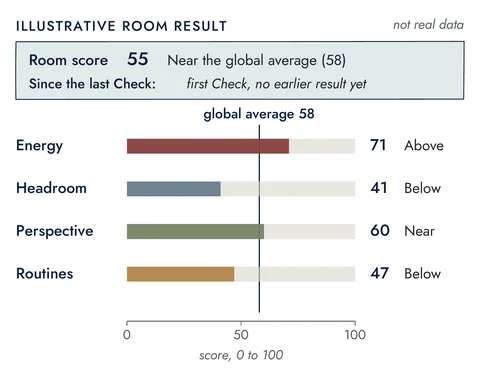
Your report appears as soon as you send your answers, and only you see it. It shows your Prechange Index, from 0 to 100, and a score for each of the four conditions. It names your weakest condition, the weakest link. It shows each condition beside the global average, and how things have moved since your last Check, in words. It ends with "What you can do this month": two things you can do yourself, one question to raise with your team, and where to go further. The bands are 0–39 Not ready, 40–59 Prepare first, 60–79 Workable and 80–100 Ready. They are working assumptions, not fixed cut-offs. As a guide, treat a change of 5 points or less as no real change. Changes that hold across a team matter more.
Reading results, and where to start
Results always show the four conditions in the same order: energy, headroom, perspective, routines. Start with the weakest one. If headroom is low, make room first for any step that asks people for more time or attention. Then work on the weakest condition, and after that the next weakest.
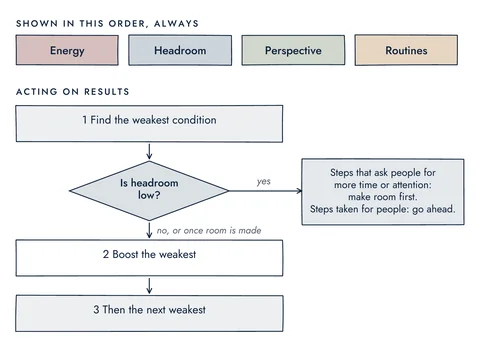
Steps that ask people for more time or attention: make room first.
Steps taken for people: go ahead.
From Tilth: Preparing the Ground for Change by Sukant Ratnakar.
A Room's results add how many people took part, as a share of the team: Low (under 40%), Fair (40–59%), Strong (60–79%), Excellent (80–99%) or Complete (100%). The more people take part, the more the results can be relied on. They show how people spread across each condition as counts, never names. Rooms and teams are never ranked, and never labelled top or bottom. These results are a reality check, not a grade or a badge. They must never be used to judge, select, rate or reward anyone.
The global average
Every Check joins one global pool. The global average is worked out from each person's latest Check of the same version of the Check. It appears once enough people have taken that version. Until then, you'll see "Global average: not enough people yet." Checks sent in under 60 seconds, or with the same answer to every statement, are left out of it.
From Tilth: Preparing the Ground for Change by Sukant Ratnakar.
Each condition reads Above, Near or Below the global average. Near means 5 points or less either way. There are no plus or minus figures and no arrows. Your report keeps the global average from the day you sent your Check, with its date, and a Room's results keep the one from the day it closed. The global average gives context, not a target.
Prechange Live
At Prechange Live events, people take the Check through the event's own link, and we look at the group's results together on screen. Group results show from 5 people, and are updated each time 5 more finish. No names, and no one's answers. If you took the Check in the last 90 days, you can bring your latest Check to the group instead of taking a new one. Each event, with its date and its link, is on the Events page.
The levels
As an Individual, you take the Check and get your own report and history. Consultants, HR managers and business leaders can join the Prechange Partner Programme. Once approved, they become Associates: they can open Rooms, see their own Rooms' results and read the Associate Guide. When 25 different people have taken the Check through an Associate's own Rooms, the Associate becomes a Member and also sees the global average in more detail. A Member stays a Member with 25 people each year. A Partner holds a licence from Quantraz, as a Consultant Partner or an Organization Partner, and has completed its training.
Your answers and your privacy
No organization, leader or partner sees your individual answers. Quantraz opens a report only to give support, and every such view is logged. Your name and email never appear in any group result. You can ask us to delete your data at any time. We then delete your name, email and other details, and copies in our backups expire within 35 days. Your scores stay in group results and the global average, without your name. Everything we collect, and why: Privacy
Changes to this page
- First version of this page.